
Precision & Recall
“Say what you mean, and mean what you say.” It’s the only design principle that matters. It implicates language, paintings, jazz, fashion, classifiers, and interfaces, to name a few. It’s also the most unhelpful principle as the unresolvable tradeoff at the heart of the universe, the heart of compression. Precision vs. recall.
- How often are you meant when said?
- How often are you said when meant?
The perfect-precision interface is only there when needed, and the perfect-recall one is always there when needed. We of course want 100% precision, 100% recall. Wouldn’t that be just dandy.
Tough luck. Every atom of surface trades precision for recall. Spend them wisely. Now how best to spend them on a computer-using harness? Perhaps a MacOS app that drives your desktop?
Figure 1. Shake to activate. Shake again to intervene.
Rethinking Cursors with Full-Self Computing
Our policies needed to be vibe-checkable outside of closed-loop evals, and our customers eventually needed an app to download. So we needed a unified harness that resembles the real deployment environment. I volunteered as tribute after growing increasingly frustrated with our previous jugaad of a remote Windows VM harness.
Said jugaad took ~3 mins per iteration by naïvely loading model params into process memory, and using VNC as the interaction protocol. The VNC network latency was 80ms, since the cluster “desktops” live halfway across continental US. For reference, the human photon-to-finger propagation delay is ~200ms. It felt like drunk goggles. Yet self-driving does not feel like drunk goggles, so we ought to hold ourselves to higher standards.
Service-level Objectives
Desktops are like cars…
- Structural: one driver at a time, be that human or ANN
- Accuracy: when the student drives, the teacher must supervise
- Energy: edge device. Careful not to eat all the coulombs
- Throughput: who cares? Just my vehicle
- Latency: respond fast or bad things happen (although desktops are soft-real-time)
…so how can we make computer-use feel like self-driving? Self-driving is always there when needed (activation button is reachable even when incapacitated or dying), and almost never when not (deactivation requires non-negligible wheel shake).
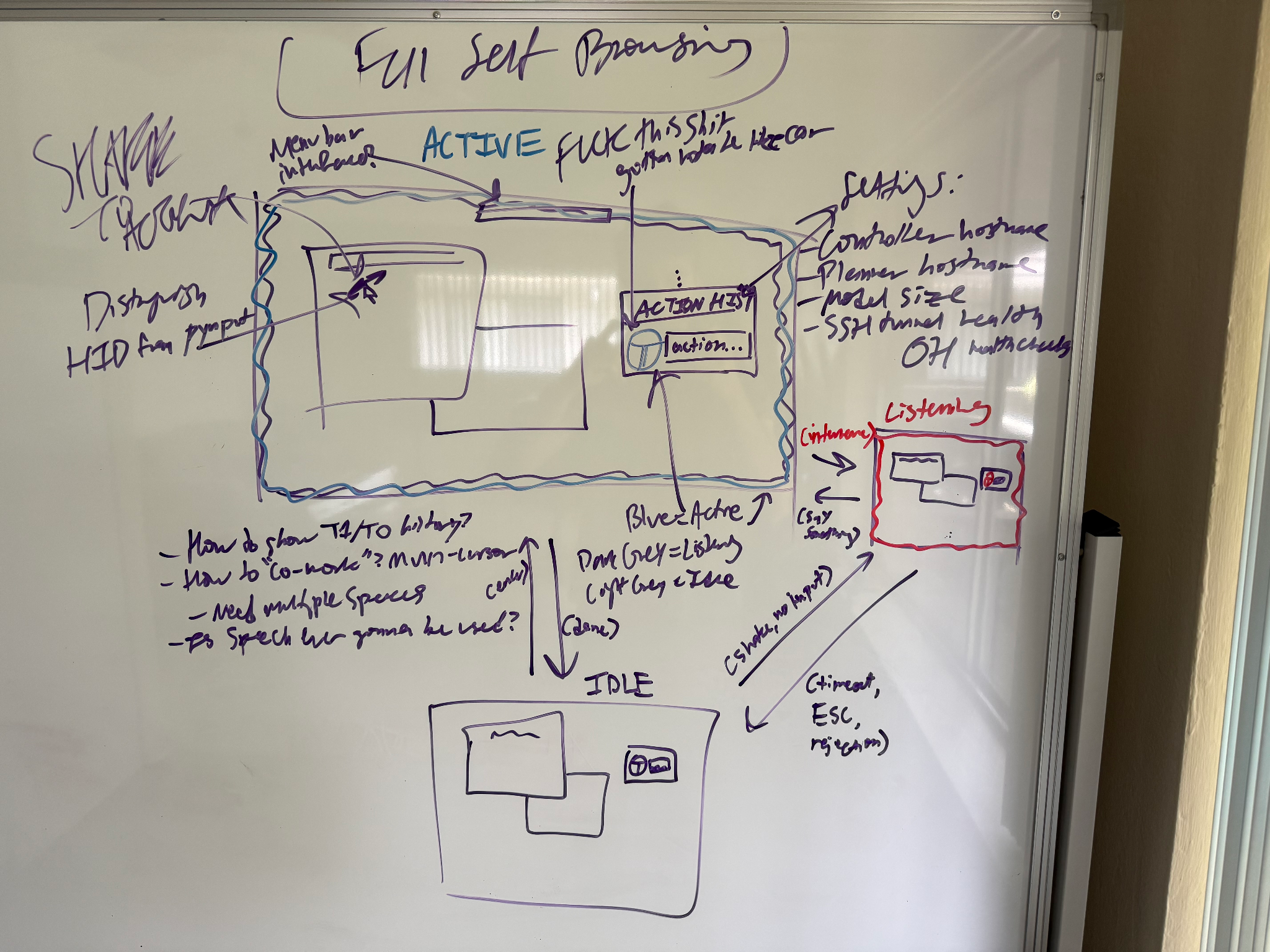
Figure 2. A three-state machine operated with shakes and speech.
The key feature of this sketch: slim control panel. Three states,
IDLE-LISTENING-ACTIVE, whose transitions were mouse shakes
and speech commands. A pill-shaped popup, whose steering wheel icon
turned with you, almost like there were axles under your cursor.
Configurable for everything needed to test drive our policies.
Pill Interface
Figure 3. A pill-shaped window with steering wheel that follows the cursor.
Axles under your cursor
The design goal is for the wheel to bank the direction your hand is
moving, like a car being steered. A global NSEventMaskMouseMoved monitor
fires on every system-wide pointer move without needing CGEventTap
permissions (which would have to be requested every time). Each tick
gets the cursor’s direction as atan2(dy, dx) against the
previous frame’s position and assigns it to the SVG’s
affineTransform rotation. But there’s a bug hiding in that
one line. Across monitor boundaries, the deltas are noise.
atan2(0.3, -0.2) flaps wildly, so the wheel spins like it’s
possessed. Fix: normalize all x positions with the monitor
arrangement, and clamp the angle to [-45, 45].
The 80-20 win was simply vllm serve as a daemon on the
remote node so it persisted between uses. Cut the amortized iteration
speed from 3 mins $$$$ 3 seconds, which was expectedly popular among
devs.
I could’ve stopped here, but something about this popup luckily annoyed me to no end.
Figure 4. FSC’s first X post.
It gets shoved behind windows! It was too small to locate easily without being pinned. I had to move the popup to the exact (x, y) where you could monitor the action history while it did things. Surely we could compress it into nonexistence.
But what would we lose by compressing?
Figure 5. FSC establishes a TCP tunnel to the node serving vLLM.
Well first, with vLLM served on the cluster, we need to surface the tunnel and heartbeat status. I found that a 500ms debounce and simple status indicators eliminated that entire class of headache. Hovering over the cross would show the SSH error.
Figure 6. FSC enables planner-only and controller-only execution.
Second, we want to test-drive the planner and controller policies separately. If controller-only, interpret the text box as a low-level action. Else, a high-level plan. I found that pastel green and orange communicated state sufficiently while complementing the self-driving blue. “Why not the primary colors red and yellow?”, you might ask. Because they felt like error and warning, while the app wanted to feel resilient.
|
|
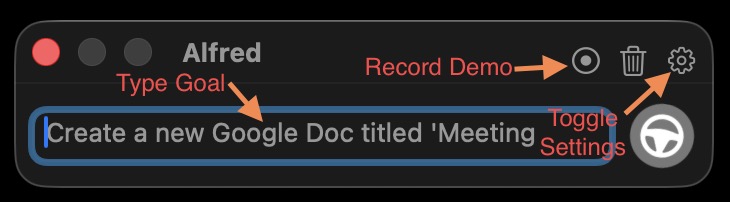
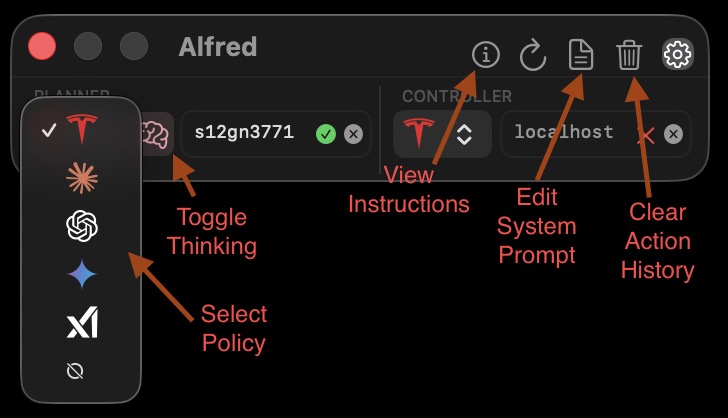
Figure 7. Usage and settings.
Third, we need to surface an array of actions and configurables. Which policies? What nodes? What goal? What system prompt? Reasoning or non-reasoning? Do you want to clear history? Do you want to record a demo? Do you want to view instructions?
All of these questions were being answered by a thumb-sized pill, and we’d quickly sacrifice recall with further compression.
But no-one cared outside of our team. Customers just want it to work silently without touching the defaults. So we could kill the popup to solve the backgrounding problem by demoting such things to the Makefile.
That brings us to this NSMenu.
Menubar Interface
Through the world’s gnarliest hack, you can make an NSMenu a text input field. All it needs is the focus capability.
NSMenu as text input?
NSMenu is built for NSMenuItem rows, not editable text. Its tracking
loop runs a CFRunLoop that eats keystrokes and fuzzy-matches them
against menubar items. To turn it into an input, I used a custom NSView
hosting an NSTextField, and forced [window
makeFirstResponder:textField] the moment the menu opens, then
intercepted Escape and Return at the NSEvent level before they bubble
back up to the menu’s tracking loop. Otherwise typing “open” would try
to invoke a non-existent “Open” command and the menu closes itself. This
unfortunate song-and-dance trudges through about thirty years of AppKit
assumptions about what a menu is.
Figure 8. FSC uses a synthetic cursor operated with shakes and speech.
This is the first version that made it into customer hands. Two modes of goal-input: speech and type. It was on-device NSSpeech. The idea was that people would be chatting with their coworker and tell them “one sec, let me reroute my FSC.” Then they’d shake their cursor and say, “no no! I want you to do X, Y, and Z instead!” and turn back to their friend. For false-positives, they can click it away.
Not a single person outside of me used the speech >5 times. In retrospect, speech is the most socially awkward and redundant brain-to-laptop interface because the keyboard is right there. Just type it! Brain-to-text will be a magnificent interface to computer-using agents, but never should anyone decode text-to-speech as an intermediary!
Two more requirements were brewing at the same time, and overloading the hardware cursor was quickly proving insufficient.
Buddy Interface
Figure 9. Synthetic cursor prototype (top), improvement with lag (left), without lag (right), and with activation and intervention (bottom).
We want to do work at the same time as FSC, so we multiplex the display server by binding a synthetic cursor to each non-primary monitor.
Multiplexing WindowServer?!
macOS has no display-server multiplexing primitive (unlike X11 or
Wayland), so the cursor itself is a borderless NSWindow set to
kCGScreenSaverWindowLevel, which sits above the Dock, apps,
and Mission Control. The collection behavior is CanJoinAllSpaces |
Stationary | FullScreenAuxiliary, so the overlay travels across
Spaces and survives fullscreen transitions. Synthetic input is
the harder problem: CGEventPost(kCGHIDEventTap) works for
unsandboxed targets, but Chrome, Slack, and Electron friends reject
events that didn’t originate from a real HID device. The workaround is
an out-of-process auth bridge
(cua-driver) that uses
Apple’s private SkyLight framework to route the event through the same
privileged path as the trackpad. The cursor you see is just a mirage,
while the driver is a separate backgrounded signed binary.
- Notice how the first prototype took three shakes? How it’d show a hover tooltip at random? How the textbox was static without negative space?
- Synthetic cursors are necessary to multiplex the window manager, where the real cursor is HID and synthetic is a visage driven by this open-source executor.
- Why the cursor lag (left)? Potato performance? Not at all. I think the lag makes it feel like a buddy who’s watching your screen and reacting to your movements, rather than a stiff extension of self (right).
- A critical responsibility of the harness is collecting on-policy rollout interventions for a training stage called DAgger, in order to extend the manifold toward underfit states. A rolling buffer of 30 seconds is auto-recorded and labeled by the user.
I found that an opacity of 0.2 is sufficiently invisible at daytime brightnesses (<80%) while subtly reminding you of its existence.
Refresh-rate-independent interpolation
The follow loop is an exponential-decay interpolation ticking at the
display’s native refresh rate. The 0.5^(dt/T) form
keeps the convergence half-life constant across 60Hz, 120Hz, and 240Hz
panels: same wall-clock feel regardless of which monitor you’re on.
Another three-state machine (OFF-AGENT_ONLY-ANYWHERE) gates
whether the loop runs at all, so the agent’s 140ms click animation never
fights the lerp. Enum assignment is atomic via Python’s GIL, so no locks
and no races between the follow thread and the executor. The 40ms
half-life I landed on is fast enough to feel responsive but slow enough
that you can see the cursor reacting to you, which is what
sells “buddy watching your screen.”
The behavior reflected in our fleet data:
- When a human plugs in a second monitor, they take the big screen and FSC takes the laptop screen. A shake on the big screen summons the FSC cursor, and it returns to the monitor to execute the goal.
- When a human plugs in two monitors, there’s an FSC cursor on each of the two smaller monitors. Then a shake on the main monitor is a no-op, and you have to shake on an FSC monitor to activate.
The negative feedback about the current app generally stems from inference latency, false shake classifications, and wanting to see reasoning/action history in failures.
Figure 10. Cancel bad activation with a click.
- Inference latency is going to be masked by morphing the synth cursor into a spinner. Currently it just sits there.
- The F1 of action shakes will be lifted by conditioning on the entropy of past mouse (x,y). Activation is generally meant from rest, not from motion. A proxy of entropy is good ol’ zstd compression ratio.
- Action history will be surfaced by scrolling in ACTIVE state, since we can take the assumption that the user is focused on the FSC cursor after shaking. Though this creates the false-positive case where they trigger and attempt to scroll, then have to click before their scroll propogates.
Figure 11. Cancel bad intervention with a click or timer.
Just look at how responsive it is now. How the opacity and color cooperate to convey state without a rectangular surface area. And that thumbs-up flash post-intervention quantitatively increased our feedback rate. The power of small rewards. If you don’t want to give an intervention reason (common case), then you can click it away.
Figure 12. Complete feedback iteration loop.
ChatGPT Agent’s in-app harness is expectedly more polished than mine. A whole team vs me in my free time. Even if synthetic cursors turn out to be too imprecise for CUA, the underlying idea is to escape the edges of the rectangular app paradigm. As for whether it’s better remains an open question.
All we can say is that interfaces closer to the system’s primitives produce shorter descriptions of the user’s intent than those further. So perhaps “better” can mean shorter. Describing some aspect of the universe using less, simpler medium (precision), or more of the universe with the same amount of medium (recall). Ever in pursuit of the shortest description, the theory of everything. Never to arrive.
So what should you say? Say what you mean, and mean what you say.